Build custom models using Amazon Rekognition
Create custom image and video analysis models with Amazon Rekognition.
Amazon Rekognition is a machine learning service for image and video analysis. It provides a wide range of features to suit many image and video analysis use cases.
Features
- Content Moderation: This can be used to detect inappropriate, unwanted or offensive content.
- Face compare and search
- Face detection and analysis: This feature can be used to identify attributes such as open eyes, glasses, facial hair etc.
- Labels: We can use this feature to identify labels — an object, scene, action, or concept found in an image or video based on its contents
- Custom Label: We can train machine learning models using existing images and use those models to analyse images
- Text detection
- Celebrity recognition
- Video segment detection
- Personal Protective Equipment (PPE) detection
These features can be used to develop applications that requires to identify inappropriate content in the media, verify identify online, streamline media analysis and many more.
Custom Labels
We can use Amazon Rekognition to spot wide ranges of labels in an image whether they contain a human, city, building, car, money etc. Here is a result from Amazon Rekognition when an image of ten rupees note is uploaded.

While above analysis recognizes that the image contains money but it does say that it is “ten rupees”. We can use “custom label” feature to build a model to identify Indian currency notes.
Here are the steps to create, test and use a model using “custom label” feature:
- Go to AWS console and switch to “Amazon Rekognition” service and choose “Use custom label” menu item to open “custom label” user interface.

Create a dataset
A dataset is used to store collection of images and labels against those images. Images are categorized as “Training” and “Test” datasets.

While creating a “dataset”, you can upload images from a computer or images can be imported from S3. Images can also imported from an existing dataset or SageMaker Ground Truth (service used to label content) as well.
Label images
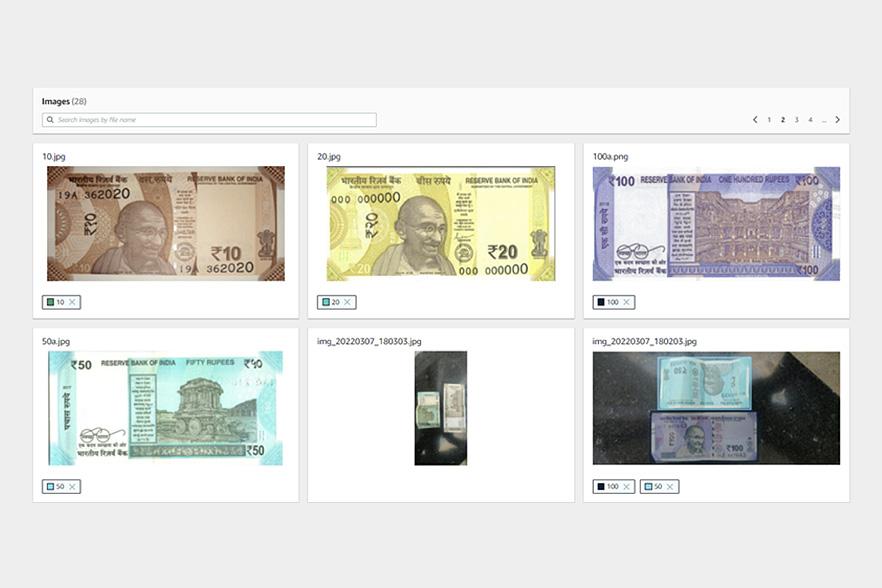
Image can be labelled once they are imported into the dataset. Images can be labelled at either at an “image-level” or parts of the images can be labelled by drawing boundaries. Below are couple of examples:


To label an image, user has to click “start labeling”, choose an image and choose either “Assign image-level labels” or “Draw bounding boxes”. Labels has to be creating before assigning them to an image.

Click on “Finish Labeling” once all images are labelled. A dataset can updated any time to add more images or label images.

Train model
Once the images are labelled, these can be “trained” to build a model by clicking “train model” option. Training process can take from minutes to hours depending on the training data. Below is a sample training model built to identify “Indian currency notes”:

Using Model
Model can be made available using “start model” from “Use Model” tab. User can select number of interface points based on the throughput required.
Here is a sample AWS Lamda code built based on python language to call this model.
import boto3
def lambda_handler(event, context):
    client=boto3.client('rekognition')
    response = client.detect_custom_labels(Image={'S3Object': {'Bucket': '<bucket-name>', 'Name': '10.jpg'}},
        MinConfidence=0,
        ProjectVersionArn='arn:aws:rekognition:us-east-1:<aws-account-id>:project/rupees-rekognition/version/rupees-rekognition.2022-03-07T22.48.02/1646673482294')
    return {
        'statusCode': 200,
        'body': response
    }
This takes the S3 location of the image to be analyzed and the “arn” of the model that is built using AWS Rekognition.

Related Posts
Building a MLOps Environment with AWS ML Services - Part 2
How to Build a Robust MLOps Pipeline with AWS Cloud-Native Tools
Building a Scalable Data Science Environment with AWS ML Services - Part 1
As machine learning (ML) becomes a critical driver of innovation, organizations are increasingly looking for robust, scalable environments to support data scientists in their experimentation, model training, and deployment workflows. AWS offers a comprehensive suite of tools and services, led by Amazon SageMaker, to build such environments while addressing challenges like infrastructure management, cost optimization, and operational efficiency. This blog explores how to create an advanced data s

Datahub Hive Kerberos Authentication
Did you know that nearly 70% of enterprises face challenges when managing secure data ingestion from protected environments? With the increasing reliance on tools like DataHub for data observability, the need for secure, seamless metadata ingestion has never been greater. Particularly when dealing with Kerberos-secured Hive clusters, organizations often struggle to balance security, automation, and operational efficiency. For one of our clients, this was a critical issue. They needed to integr