

AWS
How Kiro Speeds Up Development
AI That Codes, Tests, and Delivers - All on Its Own
Introduction
Every engineering team has the same invisible problem: a backlog full of tasks that are important but never quite urgent enough to touch. Dependency updates that keep getting pushed. Tests that need to be written. Follow-up fixes from last sprint's code review. Features that sit in tickets for weeks because every senior developer is heads-down on something else.
The honest answer to why this work doesn't get done isn't laziness or poor planning, it's that software development is a deeply human activity that requires concentration, context-switching is expensive, and there are only so many hours in a day.
Kiro Autonomous Agent was built to solve exactly this problem. It handles development tasks independently, in the background, while your team stays focused on the work that genuinely needs a human mind. This guide explains how it works, what makes it different from the AI coding tools you've already tried, and how to use it to meaningfully speed up your development process
What Is Kiro Autonomous Agent?
Kiro Autonomous Agent is a frontier AI system developed by AWS that works independently on software development tasks without requiring constant human guidance.
Unlike AI code completion tools that suggest the next line while you type, Kiro Autonomous Agent operates at the task level. You give it a goal in plain language, "update all Node.js dependencies across our microservices" or "write unit tests for the authentication module" and it handles the entire execution: planning the implementation, writing code across multiple repositories, running your existing tests, and opening pull requests for your review.
It runs asynchronously in isolated sandbox environments. This means it never touches your production environment, never blocks your active workflow, and never merges anything without your explicit approval. You assign the work and return to a PR when it's ready.
What makes it a "frontier" agent? Frontier agents are a distinct class of AI systems with three defining characteristics: they are goal-directed (you point them at an outcome, they figure out how to get there), massively scalable (they can run multiple concurrent tasks and coordinate sub-agents), and long-running (they can operate for hours or even days without intervention). That combination is what separates Kiro from tools that require you to remain present and supervising.
To understand the bigger picture behind autonomous systems like Kiro, check out our in-depth article on how AI agents are driving the next business revolution
How Kiro Autonomous Agent Speeds Up Development
1. It Runs While You Work on Something Else
The most direct way Kiro speeds up development is by adding working hours to your team's capacity without adding headcount. When the agent takes on a task, your engineers don't pause, they keep building. The agent runs in parallel, in a sandboxed environment, and surfaces completed work as a pull request when it's done.
For a team of five developers, this is the equivalent of a sixth contributor who never gets interrupted, never context-switches, and never needs a meeting.
2. Multi-Repo Changes Land Together, Not One at a Time
One of the most underappreciated time sinks in modern software engineering is coordinating changes across multiple repositories. A single feature might require updates to a backend service, a shared library, and a frontend client, and getting all three to land together, documented, and tested is its own project.
Kiro Autonomous Agent handles this with its multi-repo execution capability. You plan a change once. The agent creates coordinated edits and pull requests across all affected repositories simultaneously, so related updates land together rather than trickling in over days.
3. Context Doesn't Reset Between Sessions
Every time you hand a task back to an AI tool that doesn't retain context, you start over. You re-explain the architecture, re-establish the conventions, re-remind it what you've already tried. This overhead isn't zero, it accumulates into real lost time.
Kiro Autonomous Agent maintains context across tasks, repositories, and pull requests. When you return to a task that was paused, the agent already knows where it left off and what decisions were made. And critically, it uses your previous code review feedback to improve future work. If you commented "we prefer functional components over class components" on a PR last week, the agent applies that preference going forward, without being told again.
4. Routine Work Stops Interrupting Deep Work
Interruption is one of the biggest hidden costs in software development. Research consistently shows that recovering from a context switch can take 20 minutes or more. When routine tasks, dependency bumps, test coverage, follow-up fixes, require a senior engineer's attention, the cost isn't just those tasks. It's the disruption to whatever they were doing before.
Kiro handles routine fixes, follow-ups, and status updates autonomously. Engineers face fewer interruptions and maintain longer blocks for the deep reasoning work that actually needs a human.
"Solutions like Amazon Bedrock AgentCore are setting the standard for enterprise AI agents."
Kiro Autonomous Agent vs. AI Copilots: What's the Real Difference?
This is the most common question developers ask when they first encounter Kiro, and it's worth being precise.
AI copilots (GitHub Copilot, Cursor, and similar tools) are code completion and suggestion systems. They work in your active editor session, suggest the next line or block of code based on your current context, and require you to be present and directing them at all times. They make you faster at writing code during a session.
Kiro Autonomous Agent is a different category of tool. You don't need to be in a session. You describe a task, walk away, and the agent independently plans the work, writes the code, runs the tests, and creates the PR. Your role shifts from active coder to reviewer and director.
The key distinction is autonomy and a synchronicity. Copilots extend your coding ability during active work. Kiro's autonomous agent handles work when you're not there, or when you're focused on something else entirely.
They also complement each other. Many developers use Kiro IDE (with real-time AI assistance) for their primary development session while Kiro Autonomous Agent handles background tasks in parallel. You don't have to choose.
To explore how interactive agents work within your local development workflow, check out Kiro CLI
| Feature | AI Copilots (e.g., GitHub Copilot, Cursor) | Kiro Autonomous Agent |
|---|---|---|
| Core Function | Code completion & suggestions | Independent task execution |
| Context | Works in active editor session | Runs in background (no session needed) |
| User Presence | Required and actively directing | Asynchronous — assign and walk away |
| Operation | Real-time coding assistance | Plans, writes, tests, and creates PRs |
| Benefit | Speeds up coding during sessions | Completes work in parallel |
| Analogy | Copilot guiding you | Self-driving developer executing tasks |
Key Features of Kiro Autonomous Agent
Parallel Execution Without Blocking Your Flow Tasks run in isolated sandbox environments, so nothing the agent does can affect your local environment, your production system, or your current active session. Multiple tasks can run in parallel,you're not serializing work through a single assistant.
Persistent Context Across Sessions and Repos The agent maintains a shared context across your repositories, task history, and pull request feedback. It builds an understanding of how your team builds software over time, not just within a single session.
Learns From Code Review Feedback Every review comment you leave becomes training signal. The agent continuously improves its alignment with your team's patterns, conventions, and preferences, getting more accurate the longer you use it.
Creates Pull Requests, Never Merges Automatically Every code change the agent makes surfaces as a pull request. It never merges to your main branches automatically. You maintain full control of what ships.
Multi-Repo Coordination A single task can span multiple repositories. Kiro plans and executes coordinated changes across all of them, creating linked pull requests that can be reviewed and merged together.
Integrates With Your Existing Stack During the current preview, Kiro Autonomous Agent for teams integrates with GitHub, GitLab, Jira, Confluence, Microsoft Teams, and Slack, connecting to the tools your team already uses.
Who Is Kiro Autonomous Agent For?
Individual developers who want to make progress on backlog work without sacrificing focus time. Assign routine tasks to the agent during your deep work session and review the results at the end of the day.
Engineering teams that need to ship faster without expanding headcount. The agent adds parallel execution capacity across the team's entire codebase, reducing coordination drag and keeping releases moving.
Tech leads and senior engineers who spend too much time on review follow-ups, test coverage, and dependency maintenance. These tasks are exactly the kind of bounded, well-defined work that autonomous agents handle well, freeing senior attention for architecture and mentorship.
Teams on microservice or multi-repo architectures that feel the pain of coordinating cross-repository changes. Kiro's multi-repo execution capability was built specifically for this problem.
Want to understand plans, limits, and what's included during preview? Explore Kiro pricing
How to Get Started With Kiro Autonomous Agent
Access is currently in preview and rolling out gradually to Kiro Pro, Pro+, and Power users.
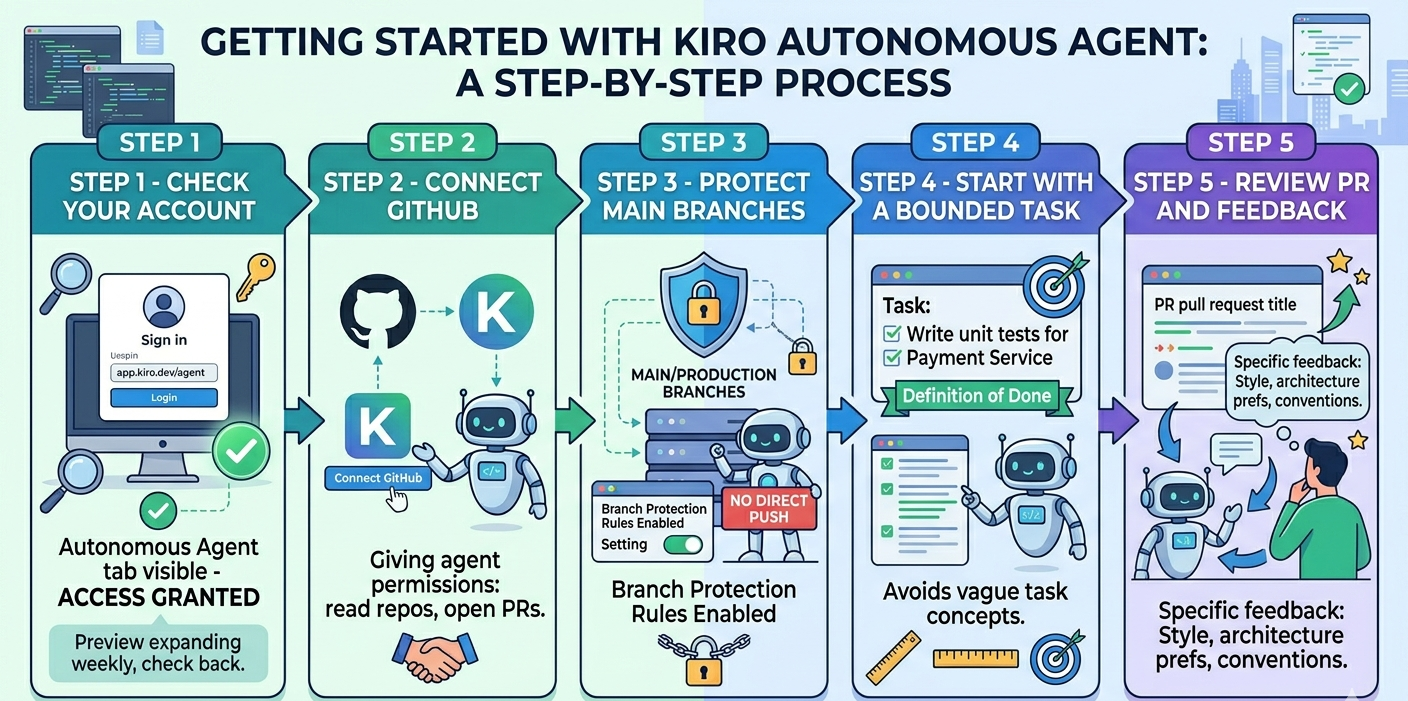
Step 1 — Check your account. Sign in at app.kiro.dev/agent. If the autonomous agent tab is visible, you have access. The preview is expanding each week, so check back if it isn't available yet.
Step 2 — Connect your GitHub account. Setup only activates when you connect GitHub. This gives the agent permission to read your repos and open pull requests on your behalf.
Step 3 — Protect your main branches. Before using the agent on critical repos, enable branch protection rules to ensure the agent can only open PRs — never push directly to main or production branches.
Step 4 — Start with a bounded, specific task. The agent performs best with clear, well-scoped tasks. "Write unit tests for the payment service" works better than "improve code quality." Give it a defined goal with a clear definition of done.
Step 5 — Review the PR and leave detailed comments. Your review is how the agent learns. Comments about style, architecture preferences, and conventions are incorporated into future tasks. The more specific your feedback, the faster the agent aligns with your team's way of working.
For a deeper technical dive and setup guidance, refer to the official documentation
Cost during preview: There is no additional charge for Kiro Pro, Pro+, and Power users during the preview period. Usage is subject to weekly limits that reset each week.
Conclusion
The gap between AI copilots and autonomous agents isn't just a feature difference it's a workflow difference. Copilots make you faster while you're actively coding. Autonomous agents add capacity when you're not there.
Kiro Autonomous Agent lets your team operate on two tracks simultaneously: the deep, focused work that needs human judgment, and the important-but-routine work that doesn't. For most engineering teams, that second track represents a significant slice of the backlog that rarely gets touched. Kiro was built to clear it.
If your team has more work than working hours, that's the right place to start.

FAQ's
1.Will Kiro Autonomous Agent automatically change my repositories?
No. The agent only creates pull requests, it never merges changes automatically. You always review and approve before anything ships. Kiro recommends protecting your main and production branches as an additional safeguard.
2.How is this different from Kiro CLI custom agents?
Kiro CLI agents configure interactive workflows for your active local development session,they define tools, permissions, and context for when you're working in real time. Kiro Autonomous Agent is fully asynchronous, running in the background on long-running tasks across multiple repos, without requiring an active session.
3.Can teams outside of engineering use it?
The current preview is focused on software development workflows. Team access integrates with Jira, Confluence, GitHub, GitLab, Teams, and Slack, so it fits into existing engineering team processes without requiring new tooling.
4.What are Kiro Powers and how do they relate?
Kiro Powers are specialized packages that add domain-specific expertise to Kiro agents, curated tool access, best practices, and context for specific development areas. The Autonomous Agent is the underlying execution system that can work independently across repos. They are related but serve different purposes.